Connect HeyReach to Outreach Magic
Webhook setup guide for unified email + LinkedIn outreach analytics
Connecting HeyReach to Outreach Magic streams your LinkedIn events into a single timeline alongside your email campaigns. No more manual CSVs or separate spreadsheets — just one place for all your outreach data.
Here's how to send HeyReach events into Outreach Magic via webhooks.
- Real-time LinkedIn event streaming
- Unified timeline view of all outreach activities
- One local timeline your agent can query
- No manual CSV merges required
Webhook
https://api.outreachmagic.io/hook/heyreach_YOUR_TOKENCopy the full URL from the HeyReach tile on the Connections page in Outreach Magic.
Name the Webhook, Paste the URL & Select Required Events
When creating each webhook in HeyReach, use the name "Outreach Magic", paste your webhook URL from above, and enable the events below. HeyReach uses one webhook per event type-create a webhook for each event you want to report.
Selected (Required for full reporting):
- • Connection Request Sent
- • Connection Request Accepted
- • Message Sent
- • Every Message/Inmail Reply Received
- • Inmail Sent
- • Follow Sent
- • Liked Post
- • Viewed Profile
- • Completed Campaign
- • Lead Tag Updated
Not Selected:
- • First Message Reply Received
- • First Inmail Reply Received
HeyReach Webhook Setup (Outreach Magic Integration)
Follow these step-by-step instructions to connect HeyReach to Outreach Magic via webhook.
- 1

Open Connections in Outreach Magic
Navigate to https://app.outreachmagic.io/connections and click HeyReach.
- 2
Select HeyReach and Copy the Webhook URL
Click the HeyReach integration tile, then click Copy Webhook URL.
Keep this webhook URL secure. It's unique to your Outreach Magic account and will be used to authenticate incoming events from HeyReach.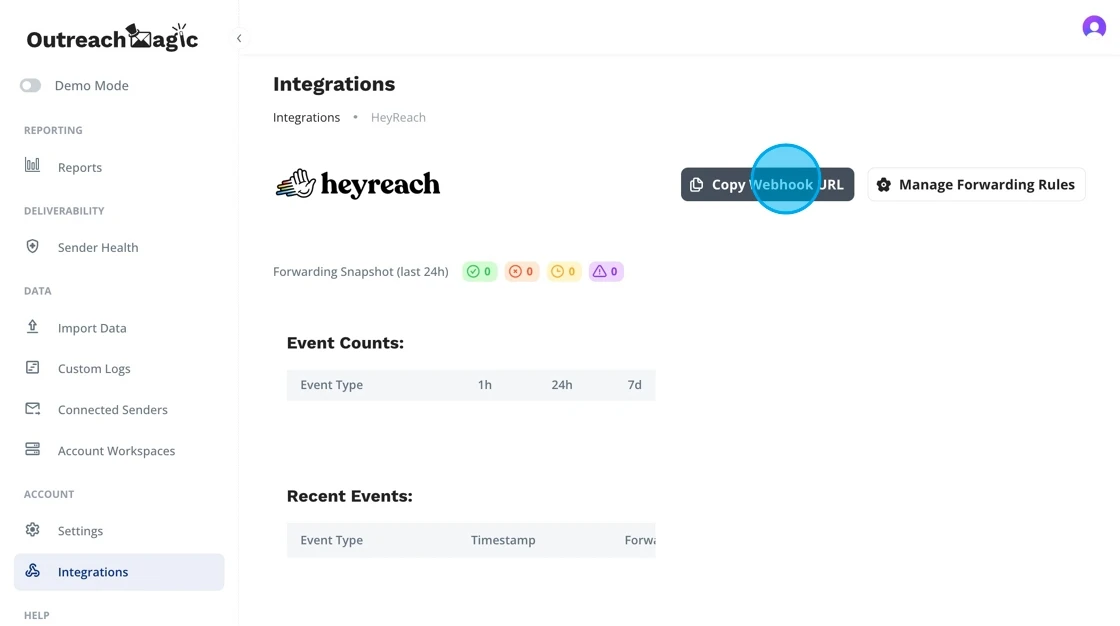
- 3
Open the HeyReach Webhooks Section
Inside HeyReach, navigate to the Webhooks settings.

- 4
Create a Webhook for Every HeyReach Event Type
HeyReach asks you to add a webhook per event type.
Create one webhook for each event type listed below, pasting the same Outreach Magic webhook URL each time. Pick a different HeyReach event type on each one.This gives Outreach Magic every LinkedIn event for full multichannel visibility. Each event type (connection request, message sent, profile view, etc.) needs its own webhook entry — but they all use the same URL.
- 5
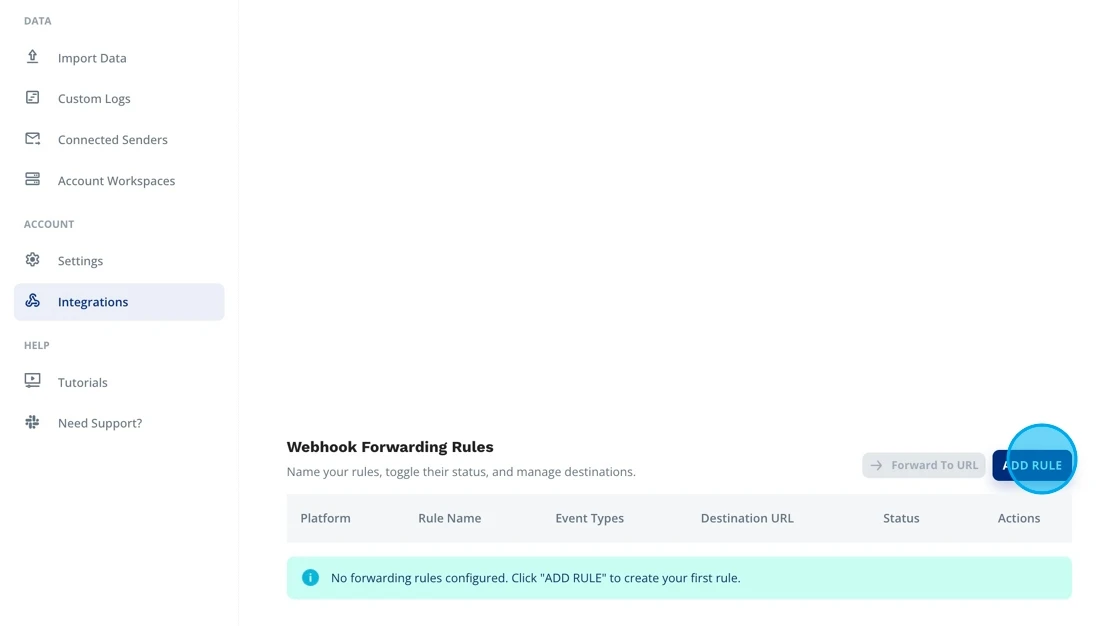
Configure Forwarding Rules in Outreach Magic (Optional)
If needed, set up forwarding rules inside Outreach Magic to automatically route incoming LinkedIn events to other tools via webhook forwarding.
This supports multichannel orchestration.
- 6

Outreach Magic Will Forward Events With Detailed Logging
Any forwarded HeyReach events include logging for:
- Forwarded payloads
- Errors
- Delivery attempts
This helps troubleshoot complex multi-integration stacks.
- 7
View LinkedIn Senders in Outreach Magic
As soon as events begin flowing, your LinkedIn senders will appear inside the Connected Senders section.
This completes your HeyReach → Outreach Magic webhook integration.
 Integration Complete! Your webhook is now configured. HeyReach events will sync into your local pipeline automatically.
Supported HeyReach Webhook Events
We process the following event types from HeyReach webhooks:
| Event Type | Description |
|---|---|
| connection_request_sent | LinkedIn connection request sent |
| connection_request_accepted | LinkedIn connection accepted |
| message_sent | LinkedIn DM sent |
| inmail_sent | LinkedIn InMail sent |
| every_message_reply_received | Reply received on any message |
| inmail_reply_received | Reply received on InMail |
| message_reply_received | Reply received (legacy; use every_message_reply_received) |
| follow_sent | Followed a LinkedIn profile |
| liked_post | Liked a LinkedIn post |
| viewed_profile | Viewed a LinkedIn profile |
| campaign_completed | Campaign finished |
| lead_tag_updated | Lead tag added or removed |
What does a HeyReach webhook payload look like?
Here's an anonymized message_sent payload. Use this to verify your webhook is sending the right data.
{
  "event_type": "message_sent",
  "correlation_id": "e6bf8960-...",
  "timestamp": "2026-06-19T04:51:13.910Z",
  "sender": {
    "profile_url": "https://www.linkedin.com/in/sender-name",
    "full_name": "Sender Name",
    "email_address": "sender@company.com"
  },
  "lead": {
    "profile_url": "https://www.linkedin.com/in/lead-name",
    "full_name": "Lead Name",
    "email_address": "lead@company.com",
    "company_name": "Company, Inc.",
    "position": "Engineering Manager"
  },
  "campaign": {
    "id": 425166,
    "name": "Q2 Outreach"
  },
  "recent_messages": [
    {
      "message": "Hey Name, thanks for connecting!...",
      "creation_time": "2026-06-19T04:51:13.603Z",
      "is_reply": false
    }
  ]
}
What Happens Next
Automatic Event Streaming
Once configured, HeyReach will automatically send LinkedIn events to Outreach Magic in real-time. No manual CSV exports or merges needed.
Unified Timeline
Your LinkedIn outreach from HeyReach will appear alongside email activities in a single, unified timeline in Outreach Magic.
Real-Time Analytics
Access real-time analytics, lead history insights, and multichannel reporting as events flow into Outreach Magic.
Multichannel Attribution
Get clear attribution across email and LinkedIn channels, helping you understand which channels drive the best results.
Troubleshooting
Events Not Appearing in Outreach Magic
- • Verify the webhook URL was copied correctly (no extra spaces or characters)
- • Check that you've created a webhook entry for each event type you want to track (same URL, different event type each time)
- • Ensure all webhooks are active in HeyReach's webhook settings
- • Wait a few minutes for events to sync (there may be a slight delay)
- • Verify that events are being triggered in HeyReach (send a test connection request or message)
Webhook URL Not Working
- • Make sure you're using the webhook URL from your Outreach Magic Connections page
- • Verify the URL starts with
https:// - • Try copying the webhook URL again from Outreach Magic
- • Check that your Outreach Magic account is active
- • Ensure the token parameter is included in the URL
Missing Event Types
- • HeyReach has you add a separate webhook entry per event type — create one for each event you need
- • Check that you've created entries for all the event types you need (connection requests, messages, profile views, etc.)
- • Verify each webhook entry uses the same Outreach Magic webhook URL (just a different event type selected)
- • Review the HeyReach webhook settings to confirm all desired events are configured
Need Additional Help?
If you're still experiencing issues, reach out to our support team or check the Outreach Magic Connections page for additional resources.
Contact SupportReady to Connect HeyReach?
Set up your webhook integration and start unifying your email + LinkedIn outreach analytics.