Check Existing Contacts Before Enrichment
Check if a contact already exists in your Outreach Magic database before running enrichment in Clay. Look up by email or LinkedIn URL—save enrichment credits and avoid paying to re-enrich the same leads.
Endpoint
POST https://api.outreachmagic.io/v1/enrichAuthentication: Bearer token required. Send your API key in the Authorization header: Authorization: Bearer <your_api_key>
Finding your API key
Your API key is available in Outreach Magic under Settings. Use it as the Bearer token in the Authorization header.
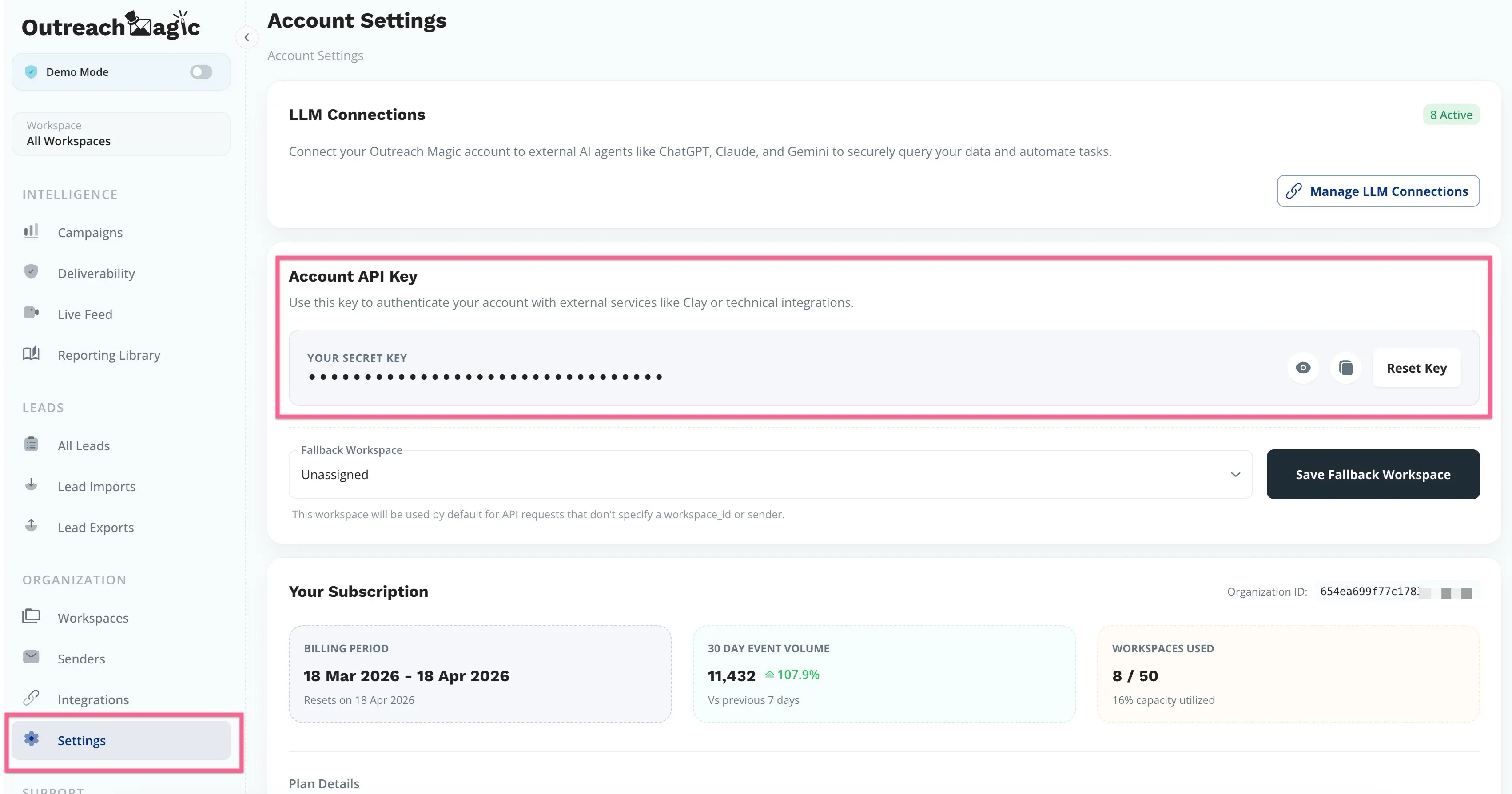
Simple request
Option A — by person: send an identifier (email, LinkedIn URL, or Sales Navigator URL). If you omit workspace_id, you get data from all workspaces that contain the lead.
Option B — by company domain + sequence slot (same endpoint): omit identifier and send workspace_id, company_domain (or company_domains), and contact_order as a JSON number (e.g. 1). The API resolves the matching lead and returns the same lead / company / workspaces JSON as Option A. You can put domain fields at the top level or under filters.
Examples — Option A (pick one):
{"identifier": "jane@example.com"}{"identifier": "https://www.linkedin.com/in/janedoe/"}{"identifier": "https://www.linkedin.com/sales/lead/ABC123"}cURL
curl -X POST "https://api.outreachmagic.io/v1/enrich" \
  -H "Authorization: Bearer YOUR_API_KEY" \
  -H "Content-Type: application/json" \
  -d '{"identifier": "jane@example.com"}'
API key from Settings in Outreach Magic.
Example — Option B (no identifier; same POST URL)
{
  "workspace_id": "507f1f77bcf86cd799439013",
  "company_domain": "acme.com",
  "contact_order": 1
}
Requires exactly one matching lead in that workspace for the domain and contact_order. If none match, you get a 404 with a clear error body.
Configure in Clay
Use an HTTP request step in Clay: POST to the endpoint above, Authorization: Bearer your API key, and a JSON body with either identifier (e.g. a column with email or LinkedIn URL) or workspace_id + company_domain + contact_order for domain-based lookup.
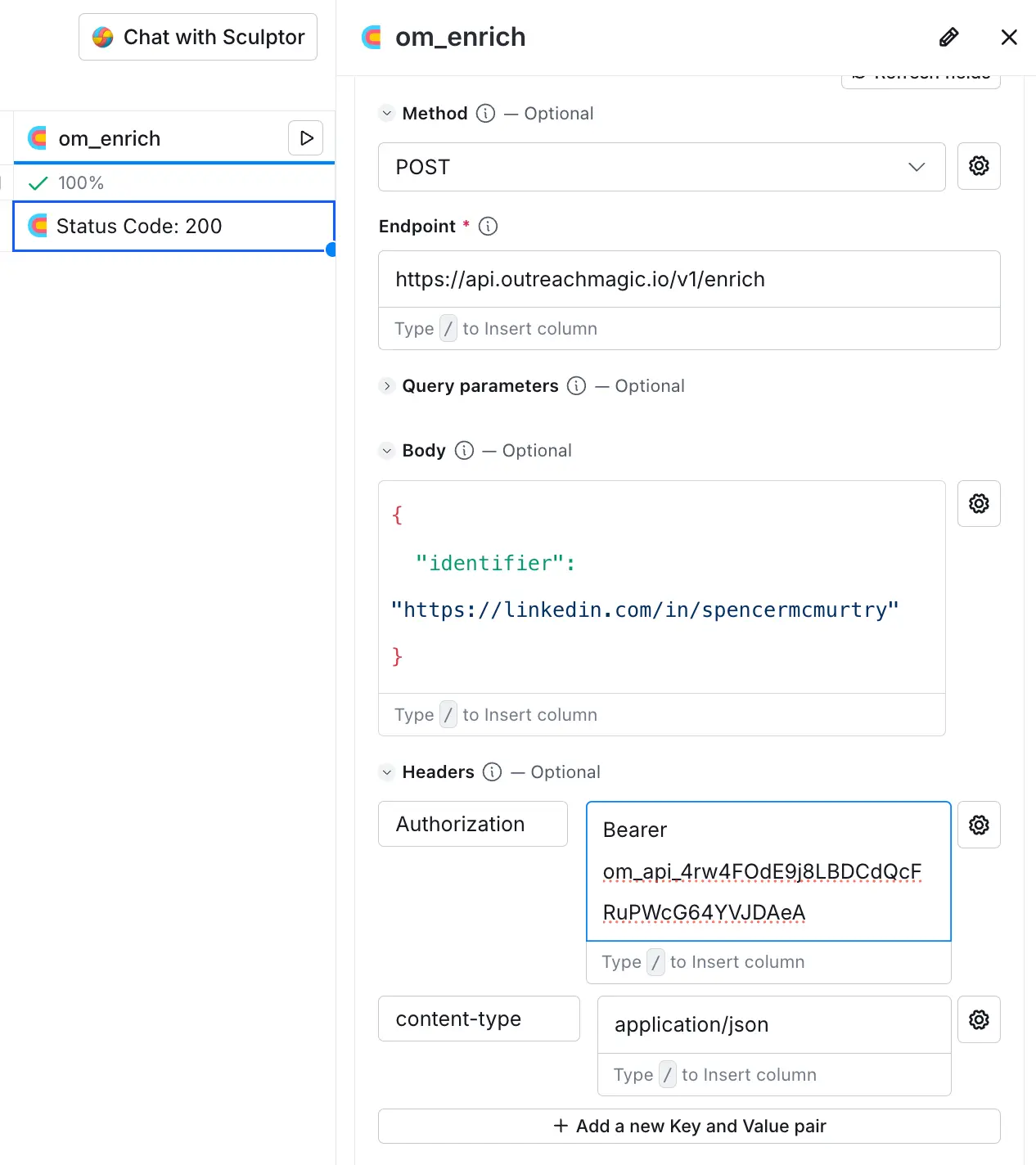
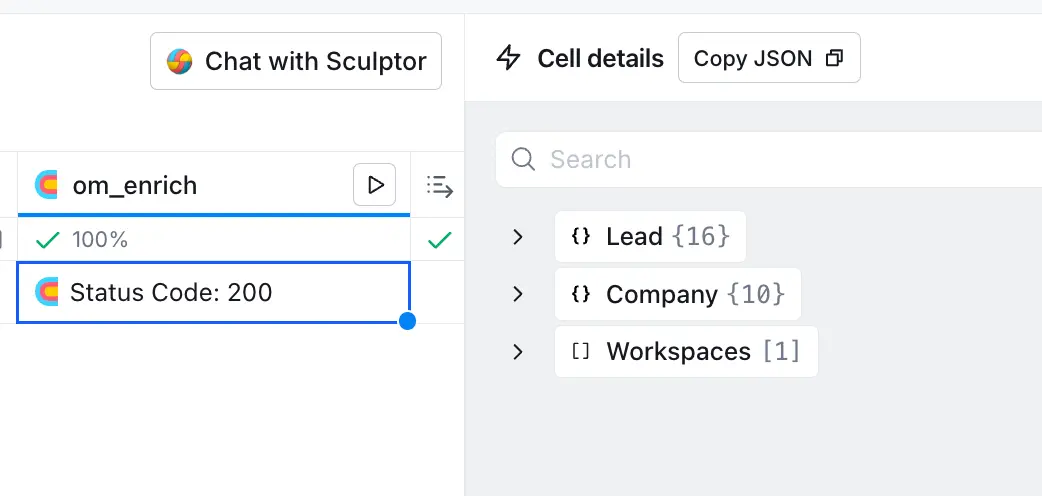
Example results in Clay
When you run the request in Clay, you get lead, company, and workspace data back. Map the fields you need into your table.
Filter by workspace
To scope results to a single workspace, include workspace_id. This keeps the API simple and easy to understand—filter by workspace only.
| Field | Required | Description |
|---|---|---|
identifier | Yes* | Email, LinkedIn URL, Sales Navigator URL, or lead ObjectId (see Identifier formats below). Omit when using company domain + contact_order instead. |
workspace_id | No** | With identifier: optional—omit to search all workspaces. With domain lookup: required. |
company_domain / company_domains | No** | Exact hostname match on stored company domain (normalized: lowercased, leading www. stripped). Use with contact_order when identifier is omitted. |
contact_order | No** | Integer sequence slot in the workspace (e.g. 1). Required with company domain when identifier is omitted. Must be a JSON number, not a string. |
*Provide identifier or (workspace_id + company domain + contact_order). **Domain lookup always requires workspace_id, a domain field, and integer contact_order.
Example request (filter by workspace_id)
{
  "identifier": "jane@example.com",
  "workspace_id": "507f1f77bcf86cd799439011"
}
Identifier formats
Use any one of these as identifier:
- Email — e.g.
jane@example.com(trimmed and lowercased). - LinkedIn profile URL — e.g.
https://www.linkedin.com/in/janedoe/(normalized tolinkedin.com/in/janedoe). - Sales Navigator URL — e.g.
https://www.linkedin.com/sales/lead/....
Response
Success (200): JSON with lead (contact, job title, location, etc.), company (name, domain, industry, etc.), and workspaces (status, recent events, connections, and outreach timing). Each workspace includes last_contacted_at (ISO timestamp or null if never contacted), has_been_contacted (true/false), and days_since_last_contacted (integer or null when never contacted).
Errors: 400 if body is invalid (e.g. missing identifier). 404 if no lead found for that identifier.
Full example response
Example response when checking if a contact exists (for SEO and implementation reference):
{
  "lead": {
    "unified_lead_id": "507f1f77bcf86cd799439011",
    "company_ids": ["507f1f77bcf86cd799439012"],
    "ids": ["jane@example.com", "linkedin.com/in/janedoe"],
    "emails": ["jane@example.com"],
    "primary_email": "jane@example.com",
    "linkedin_url": "https://linkedin.com/in/janedoe",
    "sales_navigator_url": null,
    "first_name": "Jane",
    "last_name": "Doe",
    "full_name": "Jane Doe",
    "job_title": "Senior Engineer",
    "seniority": null,
    "function": null,
    "headline": null,
    "address": null,
    "country": "US",
    "bio": null,
    "location": "San Francisco, CA",
    "mailmerge_first_name": null,
    "normalized_job_title": "Senior Engineer",
    "updated_at": "2024-03-15T14:22:00.000Z"
  },
  "company": {
    "unified_company_id": "507f1f77bcf86cd799439012",
    "name": "Acme Inc",
    "mailmerge_name": "Acme Inc",
    "industry": "Technology",
    "employee_count": 500,
    "location": "San Francisco, CA",
    "domain": "acme.com",
    "linkedin_url": "https://linkedin.com/company/acme",
    "description": null,
    "primary_mx": null,
    "email_provider": null,
    "updated_at": "2024-03-10T09:00:00.000Z"
  },
  "workspaces": [
    {
      "workspace_id": "507f1f77bcf86cd799439013",
      "name": "Sales Team A",
      "icp": null,
      "import_name": null,
      "list_source": null,
      "exclusion_reason": null,
      "tags": [],
      "lead_status": "contacted",
      "lead_status_sentiment": "positive",
      "updated_at": "2024-03-15T14:22:00.000Z",
      "last_contacted_at": "2024-03-14T10:00:00.000Z",
      "has_been_contacted": true,
      "days_since_last_contacted": 1,
      "recent_events": [
        {
          "event_id": "507f1f77bcf86cd799439014",
          "event_type": "email_sent",
          "platform": "heyreach",
          "subject": "Quick question",
          "body": "Hi Jane...",
          "updated_at": "2024-03-14T10:00:00.000Z",
          "sender_id": "507f1f77bcf86cd799439015",
          "campaign_name": "Q1 Outbound",
          "sender": "john@company.com",
          "sender_name": "John Smith",
          "sender_channel": "email"
        }
      ],
      "connections": [
        {
          "sender_id": "507f1f77bcf86cd799439017",
          "linkedin_connection_level": "1",
          "linkedin_connection_status": "connected",
          "sender_name": "John Smith",
          "sender": "john@company.com",
          "sender_channel": "linkedin"
        }
      ]
    }
  ]
}
Related
- Send Data from Clay to Outreach Magic — Connect Clay for unified reporting and push enrichment into Outreach Magic.
- Update Attributes API — Sync enriched data (e.g. from Clay) into Outreach Magic in bulk.